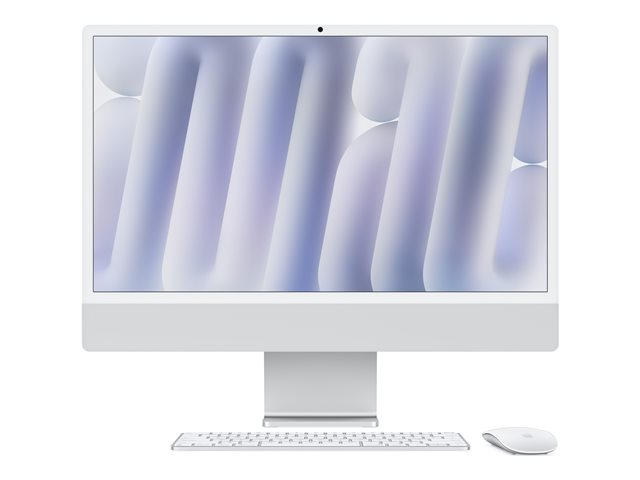
The all-in-one desktop has always made a compelling argument for businesses that want a capable workstation without the cable clutter of a traditional tower-and-monitor setup. The Apple iMac M4 takes that argument further — a 24-inch 4.5K Retina display, Apple's M4 chip, a built-in camera, a six-speaker audio system, and a three-microphone array, all housed in a unit that weighs 4.44 kg and measures 54.7 cm wide. This post breaks down what those specifications mean for IT managers and operations directors deciding whether the iMac M4 belongs in their organisation.
What the M4 Chip Means for Business Workloads
Apple's M4 chip is the engine underneath everything here. For day-to-day business use — browsing, multitasking across productivity applications, video calls, document processing — the M4 delivers noticeably snappier performance compared to previous generations. Tasks that would cause an older machine to hesitate, such as switching between a browser with multiple tabs open, a spreadsheet, and a video conference simultaneously, are handled without the lag that interrupts workflow and wastes time.
The M4 also supports Apple Intelligence, Apple's on-device AI capability built into the platform. For businesses already invested in Apple's ecosystem, this integration is native rather than bolted on — it operates at the chip level rather than relying on cloud processing for every task.
For IT managers, the practical implication is straightforward: this is a machine built for sustained, varied workloads rather than single-task operation. If your users routinely run several applications at once and expect the desktop to keep pace, the M4 architecture is designed precisely for that pattern.
The Display: Why 4.5K Matters in a Business Context
The 24-inch Retina display runs at a native resolution of 4480 x 2520 pixels. To put that in context, standard 1080p (Full HD) sits at 1920 x 1080. The iMac M4's panel delivers more than four times the pixel count of a standard HD monitor.
In practice, this means sharper text at normal working distances, which matters for users spending eight or more hours a day reading documents, spreadsheets, or code. It also means the display holds its quality when rendering detailed design files, presentations, or video content — no softness, no compromise. For roles that involve reviewing creative assets, detailed financial reports, or video production, the display quality reduces eye strain and removes the need for a separate external monitor in many cases.
The machine supports up to two external monitors simultaneously, giving power users the option to extend their workspace further if the workflow demands it.
Built-in Audio and Camera: Practical for Modern Hybrid Working
Remote and hybrid working has made the quality of built-in audio-visual hardware a genuine business concern rather than a nice-to-have. The iMac M4 addresses this directly. The six-speaker system includes force-cancelling woofers — a hardware design choice that reduces vibration and delivers cleaner sound reproduction. It supports a wide range of audio formats including AAC, MP3, FLAC, Apple Lossless, Dolby Atmos, Dolby Digital, and Dolby Digital Plus.
The three-microphone beamforming array is the more commercially relevant specification for most business users. Beamforming microphone arrays are designed to focus on the speaker's voice and reduce ambient noise — background office noise, air conditioning, keyboard sounds — rather than picking up everything indiscriminately. For staff conducting frequent video calls, client meetings, or internal briefings from their desk, this translates directly into more professional audio without the need for a separate headset or external microphone.
The built-in camera completes the picture. For organisations trying to standardise their remote meeting setup across a team, the iMac M4 provides a consistent, capable baseline without requiring additional peripherals.
Storage, Connectivity, and Power Efficiency
Storage is SSD, soldered directly to the board. This is a design decision with trade-offs worth noting for IT managers: soldered SSD delivers faster read and write speeds than a separately installed drive, but it is not user-upgradeable after purchase. That means storage capacity should be specified correctly at point of order — there is no straightforward path to adding capacity later.
Wireless LAN is supported, and the unit draws 143 watts of power. For organisations with sustainability targets or energy cost awareness, the M4's architecture is designed for power efficiency relative to its performance class — a point worth factoring into total cost of ownership calculations.
Video support covers H.264, HEVC, ProRes, ProRes RAW, and AV1 — a broad codec range that accommodates professional media workflows alongside standard business video formats.
Where the iMac M4 Fits in a UK SME Setup
The iMac M4 suits roles that demand a capable, clean workstation with strong display quality and reliable audio-visual performance. Think creative professionals, finance teams handling complex spreadsheets, operations staff running multiple applications simultaneously, or any user who spends a significant portion of their day on video calls.
It is less suited to roles requiring highly upgradeable hardware, specialist GPU workloads outside Apple's supported ecosystem, or environments standardised on Windows-based infrastructure where compatibility and IT management tooling are already built around Microsoft.
For Manchester-based businesses and UK SMEs working with a trusted supplier, Apaxon — Cyber Essentials certified and an authorised partner for Dell Technologies and Lenovo — stocks Apple all-in-one desktops through its store, supported by distribution partnerships with Westcoast, and Ingram Micro.
If the iMac M4's specification profile fits the workloads in your organisation, the full technical detail is worth reviewing before committing to a configuration — particularly given the soldered storage, where getting the spec right at purchase matters.
The product covered in this post
Get the latest IT insights
Expert tips, infrastructure news, and product updates — delivered weekly.