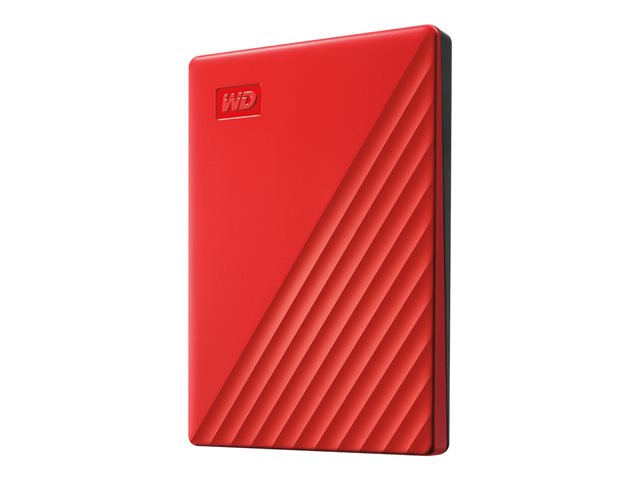
Portable storage has a credibility problem. The market is flooded with drives that are cheap, plasticky, and let down by slow transfer speeds or no meaningful security. The WD My Passport sits in a different category — not because of marketing, but because of the decisions Western Digital made in the specification: hardware encryption, SuperSpeed USB, automatic backup software, and a three-year warranty baked in. For UK SMEs managing laptops, field workers, or data that needs to leave the building without becoming a liability, those decisions matter.
What the WD My Passport Actually Is
The My Passport (model WDBYVG0020BRD) is a portable, bus-powered external hard drive. It draws power directly from the USB connection — no separate power cable, no wall adapter. The drive weighs 120g and is designed to fit in a hand or a jacket pocket. It ships with a USB 3.0 cable and works with any machine that has a standard USB port, including Chromebooks.
Bus-powered means one cable does everything. For a user moving between offices, working from client sites, or carrying data home at the end of the day, that simplicity is genuinely useful — there is nothing to forget, and nothing to set up.
Transfer Speeds and Compatibility in Practice
The My Passport connects via USB 3.0, with an interface transfer rate of 5.0 Gbps. That is the SuperSpeed standard — fast enough to move large video files, bulk document archives, or full system backups in a reasonable timeframe. For reference, the drive also maintains backwards compatibility with USB 2.0 at 480 Mbps, which means it will work on older machines without issue, just more slowly.
In practical terms, USB 3.0 at 5 Gbps is more than sufficient for the workloads this drive is built for: moving project files, backing up a laptop before a system update, carrying a working copy of a dataset to a client meeting, or archiving completed work off a primary machine. It is not an enterprise NAS replacement. It is not designed for simultaneous multi-user access or as a primary working volume for heavy creative workloads. What it does, it does well — fast enough to be useful, simple enough to actually be used.
Encryption and Security — Not an Afterthought
This is where the My Passport earns its credibility for business use. The drive includes 256-bit AES hardware encryption with password protection. Hardware encryption matters because it is enforced at the device level — it does not rely on the host machine's software, and it does not slow down the transfer pipeline in the way software encryption can.
For UK SMEs subject to UK GDPR, the encryption question on portable media is not optional. If a drive is lost or stolen and the data on it is not encrypted, that is a potential breach — one that may need to be reported to the ICO. A drive with 256-bit AES hardware encryption and password protection changes that calculation. The data is inaccessible without the password. That is not a complete data security strategy, but it is a meaningful and auditable control on portable media.
At Apaxon, Cyber Essentials certification is something we hold ourselves and help clients work toward. Encrypted portable storage is the kind of basic control that Cyber Essentials expects — and it is easy to overlook until a drive goes missing.
Software Included: Backup Without the Admin Overhead
The My Passport ships with four software utilities: WD Security, WD Drive Utilities, WD Backup, and WD Discovery. WD Backup enables automatic, scheduled backup — the kind of set-and-forget behaviour that actually results in backups happening consistently, rather than relying on users to remember.
For IT managers supporting small teams, the value here is in reducing the administration overhead around backup compliance. If users have a drive that backs up automatically and is encrypted by default, the policy practically enforces itself. WD Drive Utilities handles drive health monitoring and management, while WD Security manages password and encryption settings. WD Discovery acts as a central launch point for all WD software and any connected drives.
These are not enterprise-class backup tools, and IT managers should not mistake them for one. But for individual laptop backup, protecting against accidental deletion, or giving remote workers a reliable local copy of their files, they cover the basics without requiring additional software spend.
Where This Drive Fits in a UK SME's Setup
The WD My Passport is best understood as a personal or individual-use portable drive — not a shared network resource, not a rack unit, not a replacement for a cloud backup strategy. It operates within an operating temperature range of 5°C to 35°C and stores safely down to -20°C, which covers standard UK office and transit conditions without issue. The warranty is three years, which is a reasonable lifespan expectation for a portable device in regular business use.
Typical use cases in an SME context include: a laptop user who needs a fast local backup before a machine refresh or repair; a field technician carrying installation files and documentation; a finance user moving end-of-month files securely between machines; or an operations team running periodic data archives off primary storage. The Chromebook compatibility also makes it a natural fit for organisations that have standardised on Google Workspace with Chromebook devices.
What it is not suited for: always-on server-attached storage, workloads requiring RAID redundancy, or environments where drives are accessed by multiple users simultaneously. For those requirements, Apaxon's infrastructure team — which works with Dell Technologies, Lenovo, and HPE — can specify something more appropriate.
For individual, portable, encrypted storage with a three-year warranty and a sensible software bundle, the WD My Passport is a straightforward, well-specified choice that covers the basics without overcomplicating the decision.
The product covered in this post
Get the latest IT insights
Expert tips, infrastructure news, and product updates — delivered weekly.