





Next Working Day
On qualifying orders
UK Dispatched
Fast & reliable nationwide
Expert Support
Mon–Fri, 8 am – 6 pm
Genuine Brands
Authorised reseller
Next-working-day delivery. Order before 17:30 (England & Wales) or 16:00 (Northern Ireland, Republic of Ireland, Scotland) to receive next-working-day delivery. Orders placed before 17:30 Friday are delivered Monday; after 17:30 Friday arrive Tuesday. Upgrades — pre-9, pre-10:30, pre-noon, special and secure bulk — available at extra cost.
Orders over £100 (ex VAT) receive FREE next-working-day delivery across the UK.
Instant digital delivery. Software licences, subscriptions, warranties & insurance, and electronic copies are delivered the same day via email — provided a valid email address is entered at checkout.
This product is out of stock
We can email you when it's back in stock, confirm expected lead times, or recommend in-stock alternatives that meet the same requirements.
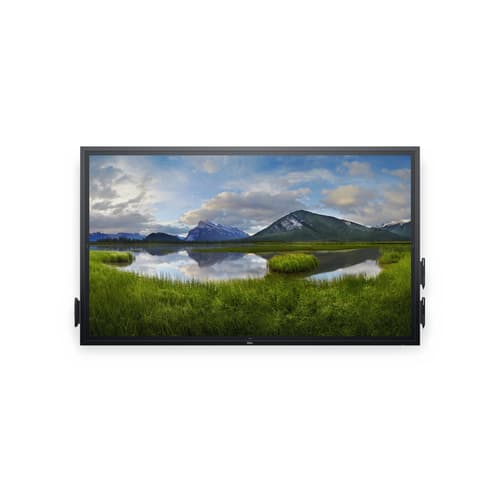
^DELL 75 4K INTACTV TCH C7520QT BLK
- 74.5" UHD LED IPS 3840 x 2160 Flatfrog InGlass Touch
- 1 x DP 1.2, 1 x VGA, 3 x HDMI, 6 x USB 3.0, 1 x RJ-45, 1 x RS232, 3.5 mm
- 8ms, 16:9, 350cd/m², 1200:1
Similar Products
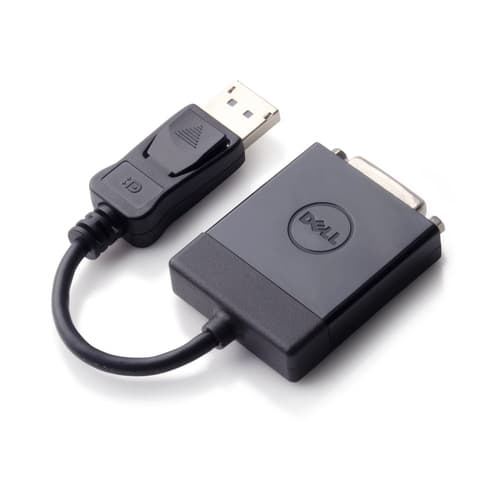
Overview
DELL C7520QT, 189.2 cm (74.5"), LCD, 3840 x 2160 pixels
Specifications
Display
- Number of simultaneous touchpoints
- 20
- Native aspect ratio
- 16:9
- Contrast ratio (typical)
- 1200:1
- Panel type
- IPS
- Display diagonal
- 189.2 cm (74.5") cm
- Display technology
- LCD
- Touchscreen
- Yes
- Display number of colours
- 1.073 billion colours
- Native refresh rate
- 60 Hz Hz
- Display resolution
- 3840 x 2160 pixels pixels
- Response time
- 8 ms ms
- Viewing angle, horizontal
- 178° °
- Pixel pitch
- 0.429 x 0.429 mm mm
- Display brightness
- 350 cd/m² cd/m²
- HD type
- 4K Ultra HD
- Colour gamut
- 72% %
- Viewing angle, vertical
- 178° °
Power
- Power consumption (standby)
- 0.3 W W
- Energy efficiency scale
- A to G
- AC input voltage
- 100 - 240 V V
- Power consumption (typical)
- 140 W W
- Power consumption (off)
- 0.3 W W
- AC input frequency
- 50 - 60 Hz Hz
- Power consumption (max)
- 270 W W
Weight & dimensions
- Display depth
- 79.1 mm mm
- Display height
- 1017.4 mm mm
- Width
- 1734.8 mm mm
- Height
- 1018.5 mm mm
- Display weight
- 64 kg kg
- Weight
- 64 kg kg
- Display width
- 1735 mm mm
- Depth
- 78.7 mm mm
Packaging content
- Cables included
- DisplayPort, HDMI, USB, VGA
- Remote control included
- Yes
Design
- Panel mounting interface
- 400 x 400 mm mm
- VESA mounting
- Yes
- Product colour
- Black
Ports & interfaces
- DisplayPorts quantity
- 1
- HDMI ports quantity
- 3
- HDMI version
- 2.0
- VGA (D-Sub) input ports
- 1
- USB ports quantity
- 7
- USB port
- Yes
- USB version
- 2.0/3.2 Gen 1 (3.1 Gen 1)
- USB connector type
- USB Type-A, USB Type-B
- Ethernet LAN (RJ-45) ports
- 1
Audio
- Built-in speaker(s)
- Yes
- Number of built-in speakers
- 2
- RMS rated power
- 40 W W
Packaging data
- Package weight
- 76 kg kg
Operational conditions
- Operating relative humidity (H-H)
- 20 - 80% %
- Operating temperature (T-T)
- 0 - 40 °C °C
- Storage relative humidity (H-H)
- 5 - 90% %
- Storage temperature (T-T)
- -20 - 60 °C °C
Carbon footprint
- Carbon emissions, logistics (kg of CO2e)
- 400
- Total carbon emissions, standard deviation (kg of CO2e)
- 1430
- Carbon emissions, manufacturing (kg of CO2e)
- 1407.7
- Carbon emissions, energy usage (kg of CO2e)
- 940
- Carbon emissions, end-of-life (kg of CO2e)
- 22.2
- PAIA version
- 1.2.13, 2021
- Total carbon footprint (kg of CO2e)
- 2770
Certificates
- Certification
- UL
Technical details
- Compliance certificates
- RoHS
- Sustainability certificates
- ENERGY STAR
Other features
- Quick start guide
- Yes
- Audio output
- 3.5 mm
- Aspect ratio
- 16:9
Network
- Ethernet LAN
- Yes
Features
- Wall mountable
- Yes
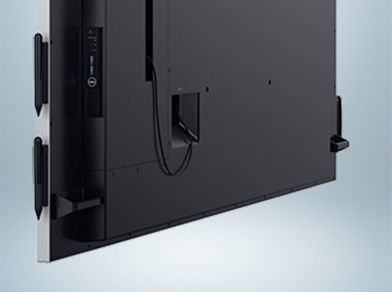
Simple setup. Streamlined manageability.
Built to ease IT management: IT can manage the monitor remotely with RS232, RJ45 and HDMI CEC connectivity.
Lock it down: Reduce display changes in high traffic environments with lock mode, a feature that allows IT to control menu and power options.

Present with power
Look for longer: Engage your audience’s attention with crisp visuals and text. And Dell's ComfortView reduces blue-light emissions for greater eye comfort, allowing your audience to focus for extended periods of time.
Eye-catching clarity: Keep the focus on your work, not distracting reflections or fingerprints, thanks to the anti-glare and anti-smudge coatings.
Speak to your audience: Bring every video or audio element to life with the built-in 2x20W speakers.

The future of collaboration
Intuitive technology: Experience natural touch functionality, a feature that allows you to annotate with your fingers, write with a stylus, or even erase written content with the palm of your hand with virtually no lag. And, since the touch functionality is compatible with most industry-standard software (as well as included FlatFrog software), it integrates seamlessly into however you work.
More ways to display: Quickly tile and arrange your applications by conveniently selecting from predefined templates with the Easy Arrange feature on Dell Display Manager software. You can also start presentations faster with Auto-restore, a feature that remembers your last presentation layout.
