The short answer: if you mainly need a central place for files and a target for backups, a NAS (network-attached storage) is usually cheaper and simpler. If you need to run business applications, a database, Windows Server services such as Active Directory, or several virtual machines with room to grow, you need a server. Many small businesses end up with both: a server for workloads and a NAS for backups.
What a NAS is good at
A NAS is a storage appliance with its own operating system, such as QNAP QTS or QuTS hero, or Synology DSM. Out of the box it handles:
- Shared folders with permissions, accessible from Windows and Mac.
- File sync between the office and laptops.
- Backups of PCs, servers and cloud services, using the vendor's backup apps.
- Snapshots: point-in-time copies that let you roll back deleted or encrypted files quickly.
- Light workloads: most business NAS units can also run containers and small virtual machines.
It's managed through a web interface, uses little power, and scales by adding or upgrading drives.
What a server does that a NAS doesn't
- Runs demanding applications such as accounts, practice management or ERP systems, SQL databases and line-of-business software.
- Hosts Windows Server roles such as Active Directory, Group Policy, print services and remote desktop.
- Virtualises properly, with many virtual machines, lots of memory and fast processors.
- Offers enterprise hardware resilience: redundant power supplies, hardware RAID controllers with cache, and remote management such as HPE iLO or Dell iDRAC.
- Comes with vendor support options, including on-site parts replacement.
Side by side
| NAS | Server | |
|---|---|---|
| Main job | Storing, sharing and protecting files | Running applications and services |
| Typical cost | Lower | Higher |
| Set-up | Simple, through a web interface | More involved; needs planning and an operating system |
| Virtual machines | A few light ones | Many, with demanding workloads |
| Active Directory | No (it can join a domain) | Yes, with Windows Server |
| Best backup role | Excellent backup target | Needs backing up somewhere else |
Neither is a backup on its own
RAID keeps a NAS or server running when a drive fails, but it copies deletions, corruption and ransomware instantly. QNAP's own guidance is blunt: RAID is not a backup. Synology similarly recommends a separate backup destination and the 3-2-1 approach. See our 3-2-1 backup guide and RAID levels explained.
What helps on a NAS:
- Snapshots: QNAP offers snapshots and Snapshot Replica; Synology offers Snapshot Replication.
- Immutable protection: Synology DSM 7.2 and later offers immutable snapshots that can't be deleted until their protection period ends. QNAP's QuTS hero offers WORM (write once, read many) shared folders that its Hybrid Backup Sync software can back up to.
- An off-site copy: replicate to a second NAS elsewhere or to cloud storage.
Common small business set-ups
| Business | Sensible set-up |
|---|---|
| Up to 10 people, files mostly in Microsoft 365 | No on-site server. A small NAS for backups and large files. |
| A team with a shared drive and large files, such as design or video | A 4-bay or larger NAS with fast networking, plus off-site backup. |
| A business running an on-site application or database | A server for the application, and a NAS as its backup target. |
| Several virtual machines and growth plans | A rack server, or hyper-converged infrastructure, with a NAS or dedicated backup storage. |
Choosing hardware
- NAS: choose the number of drive bays for your capacity in three years' time, not today. Check network speed (2.5GbE or 10GbE helps with large files) and whether you need a rack-mount model. QNAP desktop and rack NAS units are available from the Apaxon store, including the models linked below.
- Server: see rack or tower, the HPE ProLiant DL20 Gen11 and HPE ProLiant vs Dell PowerEdge. For larger requirements, Apaxon quotes Dell and HPE enterprise servers.
Need help deciding?
Apaxon can look at how your business stores and uses data and recommend a set-up, whether that's a NAS, a server, or both. See storage solutions, request a quote, or get in touch.
Sources
4 products covered in this post
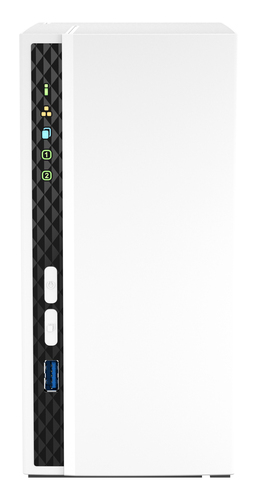 QnapQNAP TS-233 - NAS server - 2 bays - SATA 6Gb/s - RAID 0, 1, JBOD - RAM 2 GB - Gigabit Ethernet - iSCSI supportTS-233QNAP TS-233 NAS/storage server Tower ARM Cortex-A55 2 GB 0 TB QNAP QTS WhiteIn stockView product →
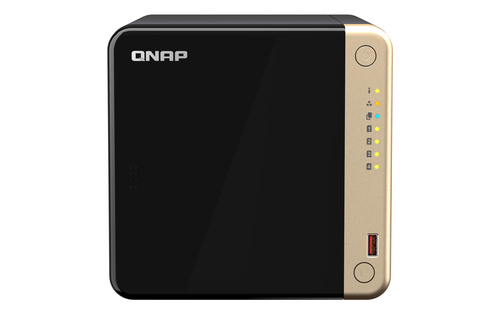 QnapQNAP TS-464 - NAS server - 4 bays - SATA 6Gb/s - RAID 0, 1, 5, 6, 10, JBOD - RAM 8 GB - 2.5 Gigabit Ethernet - iSCSI supportTS-464-8GQNAP TS-464 NAS Tower Intel® Celeron® N5095 8 GB DDR4 0 TB QNAP QTS BlackIn stockView product →
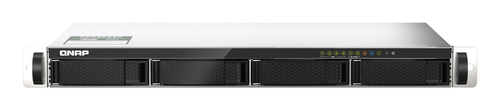 QnapQNAP TS-435XeU - NAS server - 4 bays - rack-mountable - SATA 6Gb/s - RAID 0, 1, 5, 6, 10, JBOD - RAM 4 GB - 2.5 Gigabit Ethernet / 10 Gigabit Ethernet - iSCSI support - 1UTS-435XEU-4GQNAP TS-435XEU NAS Rack (1U) Marvell CN9131 4 GB DDR4 0 TB QNAP QTS Black, GreyIn stockView product →
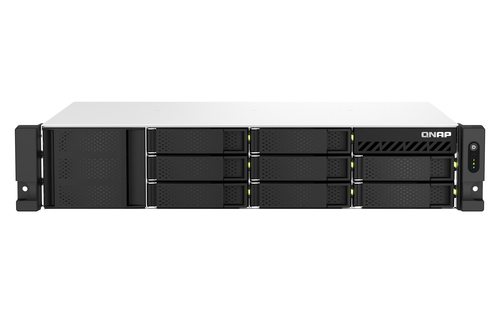 QnapQNAP TS-864eU-RP - NAS server - 8 bays - rack-mountable - SATA 6Gb/s - RAID 0, 1, 5, 6, 10, JBOD, 50, 60 - RAM 8 GB - Gigabit Ethernet / 2.5 Gigabit Ethernet - iSCSI support - 2UTS-864EU-RP-8GQNAP TS-864EU-RP-8G NAS/storage server Rack (2U) Intel® Celeron® N5095 8 GB DDR4 0 TB QNAP Turbo System BlackIn stockView product →
Get the latest IT insights
Expert tips, infrastructure news, and product updates — delivered weekly.